Clarifying questions
The fastest path to the right answer starts with the right question - and beginning today, Intelligence helps you get there faster than ever.
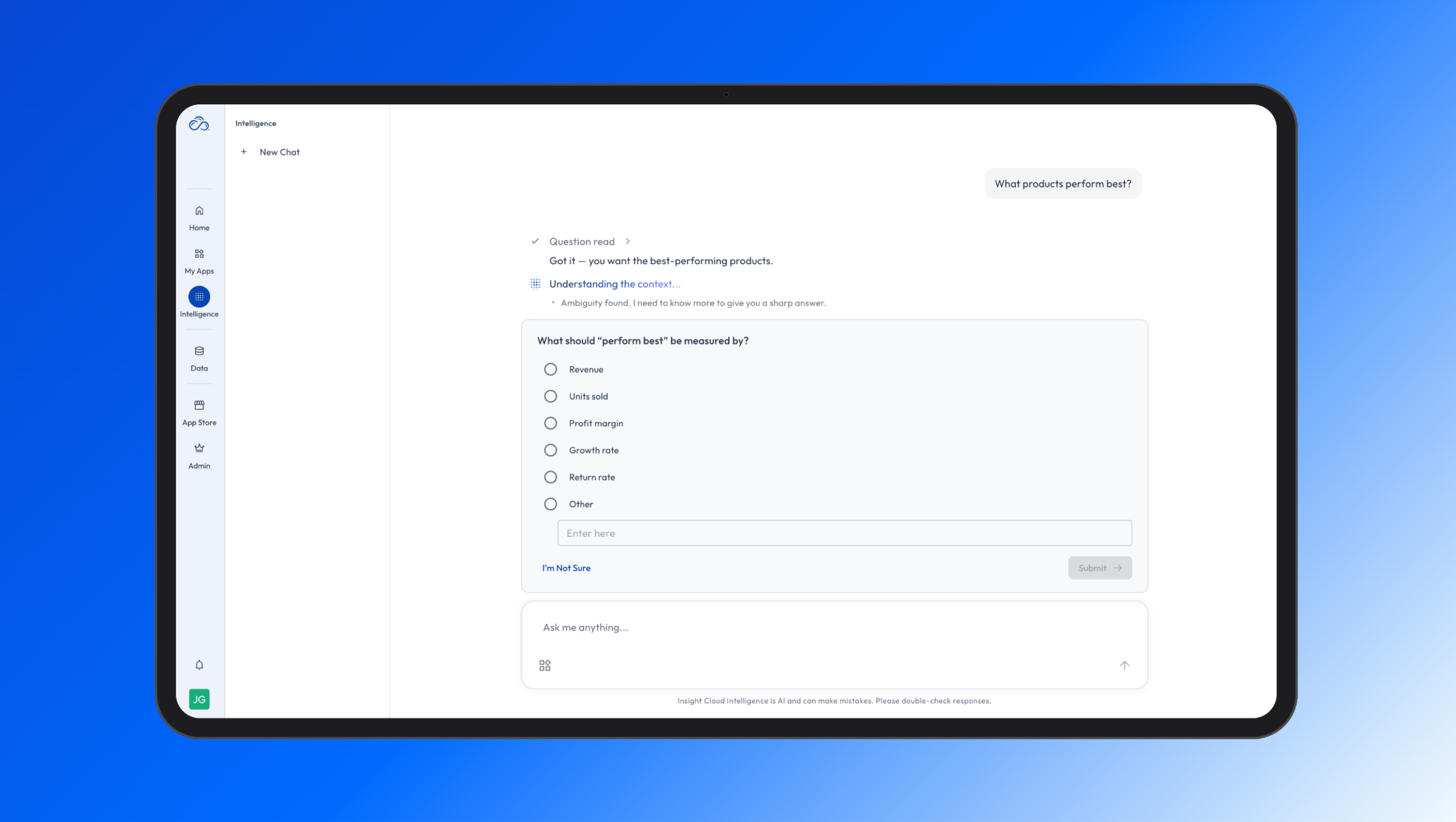
When your question could lead to more than one answer, Intelligence helps you get to the one you intended. Quick clarifying questions - informed by your context and responses - get you a better, sharper answer from the start. No unnecessary rephrasing or back-and-forth needed.
Sidebar → Intelligence → ask your question.
You'll only see clarifying questions when you need them.
The smartest questions, and the sharpest answers - natively built into Insight Cloud.
Visit the Help Center for more details.
September 17th, 2026
Write a comment...
August 27th, 2026
Data Layer: Explore and Export Your App Data!
What's new
There’s a new Data section in the Insight Cloud sidebar. It gives you one place to browse and inspect the datasets that power your apps – no direct Snowflake access needed.
Why it matters
Every app produces its analysis from underlying datasets. Until now there was no in-platform way to see that data. Data Layer lets you find those datasets, understand what’s inside them, and pull the rows you need for your own work.
What you can do now
Browse every dataset your account has access to, organized by app and variant.
Open a dataset to see the data (Data Viewer), the schema (Columns), and the inputs that produced it (Parameters).
See row counts and when each dataset was last updated.
Filter by any column, and copy the URL to share your filtered view with a colleague.
Export results to CSV. The export runs in the background and you get a Notification Center alert when your file is ready to download.
How to use it
Open Data in the sidebar and expand an app to see its datasets.
Click a dataset to open the Data Viewer.
Filter columns to narrow down to the rows you need.
Click Export. When the notification arrives, download your CSV.
Heads up
There is no row limit on exports, but there is a size limit. An export must fit into one compressed file of 5 GB. Most exports never come close to this limit, but an unfiltered export downloads the entire dataset and may be larger. Full guidance is in the Help Docs.
… and …
Notifications Center
What's new
There's a new Notifications Center in Insight Cloud, sitting next to your user menu near the bottom of the side navigation. Look for the classic bell icon to alert you when something new arrives.
Why it matters
Many workflows in Insight Cloud finish while you're doing something else. Until now that information had nowhere to live.
What you can do now
Get notified on new types of activity in the platform the moment they're ready.
See all your notifications in one list, newest first.
Click straight through from a notification to the what it's about.
Keep the ones that matter, mute the ones that don't.
Clear notifications you've handled so the list stays useful.
How to use it
Click the bell icon next to your user menu at the bottom of the side navigation.
Scan your notifications (unread items are highlighted at the top).
Use links provided in notifications to see more.
Open notification settings to mute the types you're not interested in.
Something to note
We aim to hold a high bar for what becomes a notification, and you can always lower the volume further on anything you don't need.
Read more about the Notifications Center in the Help Docs.
Write a comment...
August 13th, 2026
Improved
We’ve changed how apps load so your team can save and share the same view and custom views to collaborate better within Insight Cloud.
What's new
Everyone who shares access to the same app and variant now loads the same underlying view of the dashboard. As a result, views are now shared along with app access!
Why it matters
Everyone with access to an app variant now shares the same set of views and default settings. This gets rid of repetitive setup in order to share a view or an idea. This creates a collaborative environment where you and your team can more easily be on the same page, viewing the same information!
What you can do now
- Save a shared bookmark that everyone on the variant can open
- View shared bookmarks created by others
- Set a default bookmark for your team or organization to view every time the app opens
How to use it
1. Open your App and apply filters
2. Open the bookmark icon and choose to save as new view
3. Give it a name and optionally set it as default
4. Click save and that’s it! Other users of this app will have access to your view!
Full step-by-step instructions are in our help docs on Saved Views.
Heads up: Bookmarks are tied to the app such that if an app is significantly updated, older bookmarks may need to be recreated as well.
Write a comment...
August 4th, 2026
Catch-up release notes covering all platform updates since v.0.31.0 (April 24, 2026).
New Features
Insight Cloud Intelligence: Intelligence is now generally available and out of Beta! Since its initial launch, Intelligence has received major upgrades: inline source attribution so you can see exactly which apps informed each answer, hover-over chart values for inspecting metrics directly in generated charts, a copy button for AI-generated tables (as CSV) and your own prompts, a redesigned feedback experience (including a downvote feedback dialog), improved "thinking" progress indicators, an indicator that suggests starting a new chat when a conversation gets too long, and a full error messaging and UX overhaul. Behind the scenes, dozens of accuracy and answer-quality improvements have shipped based on real user feedback — better brand and field matching, more reliable chart generation, improved follow-up question handling, and consistent conversation routing.
Intelligence Context for Creators: App creators can now author and manage the AI context that powers Intelligence for their apps. A new AI Context tab on app listings provides an inline editor with draft, validation, and publish workflows — so publishers can directly shape how Intelligence understands and analyzes their data. Rolled out to all users in late July.
Redesigned Homepage with Widgets: Insight Cloud has a new homepage experience built around configurable widgets, including Events, Recently Viewed Apps, Apps You Might Be Interested In, and rich app cards. Org Admins can manage which widgets appear for their organization, including custom headers and sub-headers.
Flexible Variant Run Schedules: App variant runs now support more flexible scheduling — multiple times per day, specific dates of the month, and yearly cadences. Scheduling reliability was also improved with automatic handling of missed schedule runs.
Enhancements
Version Update Prompt: Users now see a prompt when a new version of the platform is available, so they can refresh to the latest version without guessing.
Registration Confirmation Email: New users now receive a confirmation email upon successful registration.
Publisher Profiles - Canadian Addresses: Publisher profiles now support Canadian addresses.
Org Admin Listing View: App configuration details are now hidden in the listing drawer for Org Admins, decluttering the view.
Quick Access Helper Text: Clearer helper text in the App Store Quick Access section.
Help Documentation: In-platform documentation links now point to the new documentation hub. More improvements coming soon!
Bug Fixes
Login & Authentication: Resolved an issue where first-time users authorizing an app were redirected to the account activation view instead of their homepage; fixed post-login redirects ignoring the destination page a user originally requested; and fixed an intermittent token refresh error that could interrupt sessions after inactivity.
Viewing Apps: Builder and Explorer users now correctly see the variant dropdown and data freshness information when viewing an app; fixed missing data freshness information in the app header; fixed variant Date Range start/end dates displaying in reverse in view mode; and resolved an error when canceling an in-progress variant run.
My Apps: Fixed a 500 error when filtering My Apps in certain organizations, and resolved an issue where upgrading applications in one org caused cascading issues in other orgs.
Data Consistency Across Tabs: Fixed data selections and data not populating consistently when working across multiple apps in multiple browser tabs.
Intelligence: Fixed conversations with tables breaking the viewport, chat messages rendering out of order when loading older history, chat scrolling issues, oversized error messages during platform interruptions, the copy button appearing mid-stream, thumbs-down feedback that couldn't be undone, incorrect colors in dark mode, and conversation lists reordering unexpectedly.
Embedded App Data Access: Resolved an issue where user attributes could fall out of sync with embedded analytics, causing inconsistent data views for affected users.
Homepage: Fixed the Save Changes button being un-clickable during initial "Reset to Default" attempts on homepage headings.
Document Center: Resolved a document upload error.
Publisher Storefronts: Fixed Storefronts not loading and issues with saving Storefront changes.
App Store: Fixed missing styles on the Contact Us form and broken breadcrumb navigation and linking.
Org & User Administration: Users can now be moved between organizations without role errors; fixed user deletion being blocked in certain cases; fixed an error when uploading an SVG organization logo; corrected fund allocation amounts in the wallet activity table; and fixed apps appearing under both "Access Granted" and "No Access" tabs.
Write a comment...
April 25th, 2026
New Features
Publisher Storefronts - With this release Seek introduces a new Publisher centric and branded store page that can not only represent the value proposition that the publisher brings to Insight Cloud, but contextualizes all that a publisher offers on the platform, and lastly publisher can highlight “stories” which are rich content to help position / market your apps in greater detail. Publishers on the platform have the ability to have a Storefront.
Enhancements
My Apps Progressive Loading: Insight cloud now offers an improved progressive loading experience on My Apps. For customers who have a large volume of apps, this fix aims to resolve any waiting time related to large numbers of apps being loaded.
Bug Fixes
My Apps Quick Filters: This release addresses an issue where quick filters were reset after a user modified pre-saved selections.
Updating App Workbook Configurations: An issue was resolve for Publishers who were editing the visual layer configuration of their apps.
Write a comment...
February 18th, 2026
Bug Fixes
Variant Runs Not Initiating: This small patch release fixes an issue where variant runs were not triggering correctly for ad-hoc or scheduled runs
Write a comment...
February 11th, 2026
Bug Fixes
App Names: This release fixes an issue where app names were not being displayed properly when users viewed an app. App names now display consistently between My Apps and viewing a specific app.
Copy / Paste Across Apps: This release resolves an issue where copy / pasting content across apps was no longer working. Users can now copy and paste elements between apps.
Write a comment...
December 29th, 2025
Features
Custom Roles: This release introduces the full capability to enable orgs to define Custom Roles based on more granular permissions. A new system role, Viewer, is now available as a lower tier from Explorer, with restricted Sigma capabilities.
AI: This release introduces the first iteration of Seek’s AI capabilities!! This project will continue to mature and evolve in the coming releases.
Sidebar Redesign: A notable redesign in Insight Cloud navigation, the new layout of the platform aims to maximize space for consuming rich data applications.
Enhancements
Org User Performance Improvements: Performance improvements have been made to the Org Admin experience when loading the User’s page.
Bug Fixes
Sharing Filtered My App’s URL’s: An issue was resolved where the My Apps URL was reset, losing key filters when shared between users in the same org.
Write a comment...
December 4th, 2025
Features
Notification Support: Another major milestone for Insight Cloud, now having a fully functional notifications framework as demonstrated in this release by the addition of 4 new notification workflows in our system. Subscribed users will now receive notifications for:
Subscription requests made to org wallet approvers
App access requests made to org wallet approver
Newly Granted App Access
App / variant run activity
App Store Configuration via CMS: This release cuts over our original static App Store homepage to a fully CMS powered App Store homepage! Even though this CMS powered app store has been live, the cutover removes the static page as the navigable App Store experience for all users.
Enhancements
Wallet Reload Improvements: Improvements were made to flows in the app store where users are reloading their wallet in the middle of a subscription flow, due to insufficient wallet balance. System prompts are now more intuitive for the user to guide them through the flow.
API Performance Improvements: This release includes targeted API performance improvements to one of the most frequently called endpoint in the platform (retrieve your own user information).
Bug Fixes
Multi-Select Variant Param Values: A handful of fixes were made to better support variant parameters that allowed multiple values, resolving a number of issues after the last release.
Invalid Embed Request Errors: A fix was made specifically when invalid embed request errors were presented when a user switched between loading multiple variants of an app. Users now successfully load the app with each change in variant.
Error Messages Resulting from Data Freshness Query Errors: Protections have been improved for Data Freshness queries so that when the data source is not available, Insight Cloud more gracefully loads the app instead of presenting errors to the user.
Wallet and Subscribe Fixes: A number of fixes have been made to various parts of the subscription allocation calculations and pro-rated subscription amounts for partial month subscription events. Users now have a more accurate picture of how their funds are and will be allocated.
Write a comment...
December 4th, 2025
Features
SBT 1.0 Support: A major milestone in this release is supporting the new version of SBT 1.0. This release requires app developers to upgrade their version of SBT to the latest release but does not fundamentally change those capabilities.
Enhancements
Multi-Select Variant Param Values: App variants can now support multiple variant param selections when configured by the app developer. Note, although supported in IC, the app also needs to support consuming multiple values.
Monthly Subscription Pricing: Publishers can now set monthly or annual subscription pricing for their apps on the store.
Insufficient Balance Warnings: Improvements were made to better inform an admin when their wallet does not have enough balance to renew their subscriptions within 30 days of renewal.
Wallet Activity Expiration Calcs and Warnings: Updates have been made to an org's Wallet Activity table to display the most recent activity first, improved wallet load expiration calculations, and updated warnings before those funds expire.
Bug Fixes
Publisher Catalog Description Search: Publisher Descriptions (from Publisher Profiles) were removed from searchable fields in Publisher Catalog for improved accuracy and results.
Team Name Updates: Team name updates were causing issues in loading that were the result of team name changes in IC.
Fund Allocation Issues: An issue was resolved where an org's fund allocations were not correctly taking new activity and subscriptions into account.
Write a comment...