Apps
Manage apps in your workspace
Overview
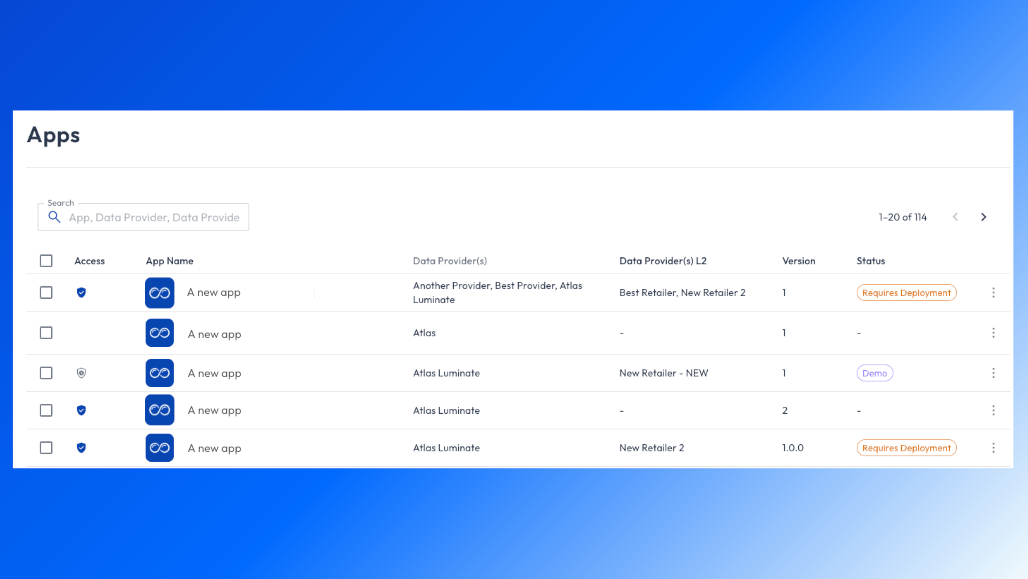
The Apps page in Org Management gives admins a centralized view of all apps connected to the workspace. From here, you can review app availability, manage access, and quickly navigate to individual apps.
This page focuses on governance and visibility, not discovery or usage.
App discovery and purchasing happen in the App Store.
What you can do on the Apps page as an admin
Admins can use the Apps page to:
View all apps linked to the workspace
See which apps are accessible
Remove access to apps when needed
Identify data providers associated with each app
Check app versions and status
Navigate directly to an app
Searching and filtering apps as an admin
Use the search bar to quickly find apps by:
App name
Data provider
Provider metadata
This is especially useful in larger workspaces with many subscribed apps.
Managing app access as an admin
Admins can manage access at the app level using the actions menu (⋯).
Available actions include:
View App
Opens the app so you can review its experience and content.
Remove Access
Removes the app from the workspace, preventing further access.
💡 Removing access does not cancel a subscription. Subscription management is handled separately.
For more details, see → App Subscriptions
Other Key Concepts
Best practices
Review the Apps page periodically to ensure only active apps remain accessible
Use Teams to manage app access at scale
Pair app reviews with subscription audits to reduce unused access
Remove access for demo or legacy apps no longer in use