Roles
Define what users can see and do in Insight Cloud
Overview
Roles control access across Insight Cloud. A role is a named set of permissions that determines what actions a user is allowed to take across apps, data, AI features, and administrative tools.
Permissions define actions such as:
Viewing or managing users
Accessing apps or reports
Managing teams, variants, or connections
Using administrative tools
Editing personal or organization settings
Roles help organizations scale access safely by assigning permissions once and reusing them across users and teams. Users can have one or more roles, and roles can be assigned directly or inherited through teams.
Roles page layout
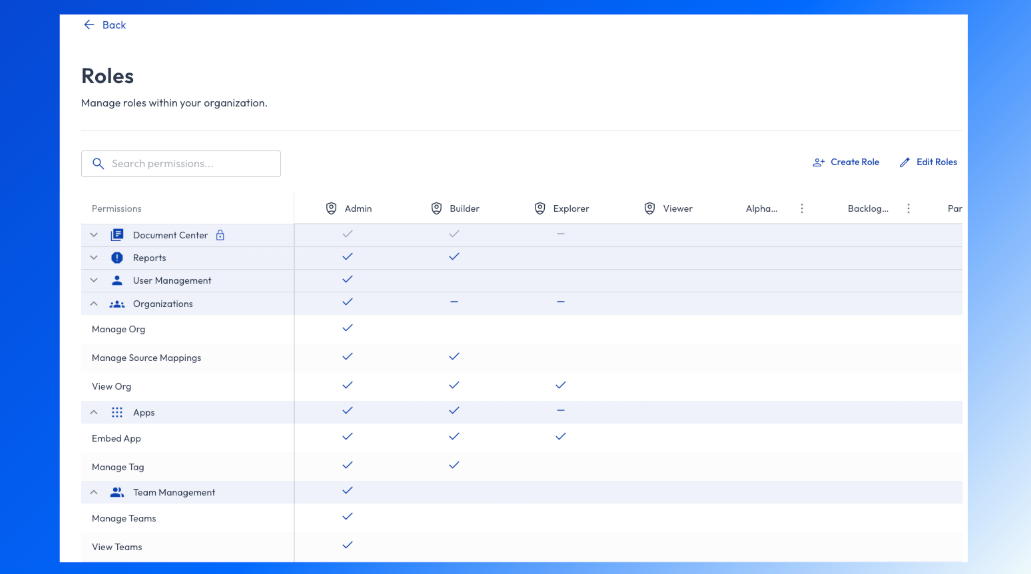
The Roles page shows a permission matrix that lets admins quickly understand and manage access.
How to read the permissions table
Rows represent permission categories and individual permissions
Columns represent roles
Checkmarks indicate which permissions are granted to each role
This layout makes it easy to compare roles and understand differences at a glance.
Permission categories
Permissions are grouped into logical categories to make role management easier.
Default roles
Insight Cloud includes a set of default roles to cover common access patterns.
Creating and editing roles
Admins can create custom roles to match their organization’s structure.
💡 Be cautious when modifying roles already in use, as updates affect all associated users.
Roles and teams
Best practices
Start with default roles before creating custom ones
Use teams to assign roles at scale
Follow least-privilege principles
Review roles periodically as your organization grows
Avoid giving admin permissions unless required